AI 3D CAD for image to CAD and photo to CAD workflows.
AI CAD Architect Pro turns machine photos into structured 3D CAD components. It is designed for industrial designers, hardware teams, and operations engineers who need accurate spatial context without rebuilding geometry from scratch.
Lock outputs to real-world dimensions and keep the CAD model anchored to millimeters.
Structured components such as chassis, screens, buttons, and dials are separated for reuse.
Download OBJ files immediately or integrate into your CAD pipeline.
AI 3D CAD workflow: upload, size, generate, export.
Provide a machine photo that shows the main chassis and interface elements.
Define length, width, and height to scale the generated structure.
The model returns with structured components and positions.
Download and refine the model in your preferred CAD software.
AI 3D CAD use cases for industrial design and manufacturing.
Model legacy equipment quickly to evaluate layout changes.
Prototype screen and control placement from real-world images.
Generate CAD structure snapshots for service manuals and training.
AI 3D mesh case snapshots
Real-world image conversions showing front-panel detail capture and structured mesh assets for downstream review.
High-density port layout captured from a single reference image and scaled to millimeter-accurate dimensions.
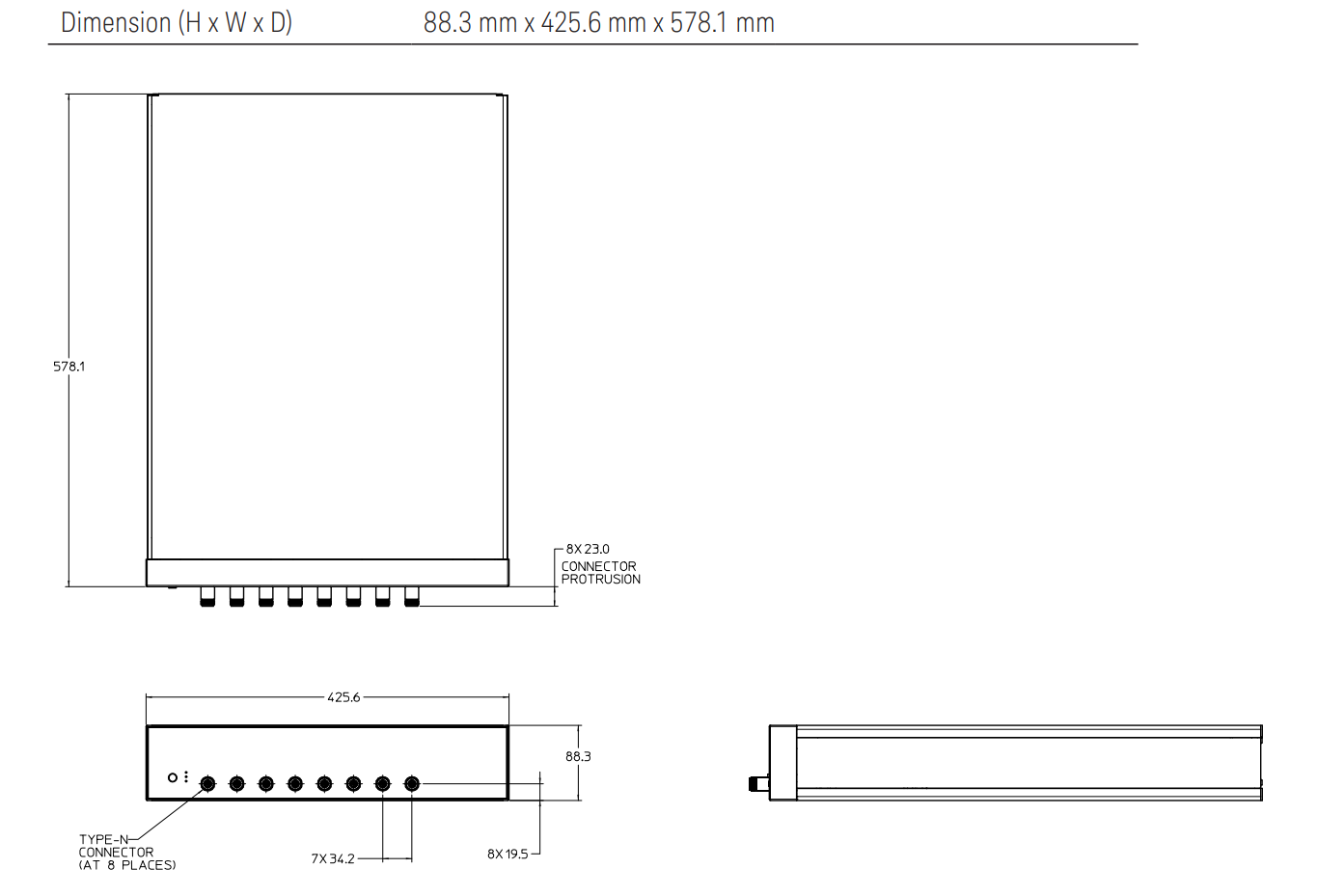
Single image, labeled ports, physical dimensions.
Structured mesh assets for chassis and port review.
Generate structured components for chassis, ports, and controls to speed up iteration and documentation.
GLB, OBJ, MTL, and texture assets ready for downstream review and refinement.
Combine multiple angles to preserve depth accuracy and eliminate front-panel-only drafts.
Faster verification cycles with clearer 3D structure and spatial context.
Reduce manual modeling hours and keep consistent 3D asset output across teams.
Hours to minutes for first-pass CAD drafts.
Evidence that image-to-3D workflows can accelerate review.
Reference image turns into structured 3D assets within minutes.
Dimensions lock to millimeters so teams can validate fit fast.
GLB + OBJ outputs integrate into existing modeling and review pipelines.
Manual modeling vs AI-assisted 3D reconstruction.
4–8 hours for first-pass geometry and interface placement.
10–20 minutes to generate a structured first-pass 3D result.
More iterations per week and faster approvals.
Plans built for continuous 3D asset generation.
$59 / month · 100 credits
$129 / month · 300 credits
$249 / month · 650 credits
Security and privacy by default.
Requests are proxied through your server so keys stay protected.
Control how outputs are stored and shared across teams.
Supports credits, audit trails, and team workflows.
Start your first AI-assisted 3D draft today.
Upload a reference image and see a structured 3D draft in minutes. Scale faster with a subscription plan.
AI 3D CAD common questions
No. It accelerates the first 80% so teams can refine details faster.
Clear, well-lit photos that show the full machine face deliver the best results.
Requests are proxied through your server, so API keys stay private.
Yes, export OBJ and connect usage data via Supabase.
ai 3d cad overview for AI 3D CAD workflows
AI 3D CAD turns visual references into structured CAD data that teams can use immediately. The ai 3d cad workflow focuses on translating visual references into structured 3D CAD geometry that stays aligned to physical measurements. This page explains what ai 3d cad means in practice, how to prepare inputs, and how to evaluate outputs so your CAD pipeline stays reliable.
This is built for industrial designers, mechanical engineers, and production teams who need image-based CAD acceleration. When teams adopt ai 3d cad, they reduce manual re-modeling and gain a consistent starting point for industrial design, manufacturing planning, and maintenance documentation. The key is to control scale, define reference bounds, and confirm the geometry against known dimensions before exporting.
ai 3d cad workflow in practice
Capture a clear image, define real-world dimensions, and generate structured geometry. A strong ai 3d cad workflow starts with clear imagery, a stable dimension baseline, and an explicit definition of what counts as a component. The goal is to provide enough context for accurate structural separation while keeping the output organized for downstream CAD edits.
ai 3d cad quality checklist
Confirm that the chassis envelope matches the reference bounds, verify that controls sit on valid surfaces, and ensure every critical interface is represented. For ai 3d cad, quality is measured by usable geometry, accurate placement, and parts that can be manipulated without extensive cleanup.
ai 3d cad outcomes
You get a CAD-ready model that is accurate enough to iterate, measure, and integrate into your existing tooling. In successful ai 3d cad projects, teams export clean OBJ files, validate component counts, and move directly into refinement rather than rebuilding the model from scratch. This keeps the CAD timeline predictable and ensures consistent results across multiple machines or product lines.
ai 3d cad means less manual modeling and a faster path from image to usable 3D CAD geometry.
ai 3d cad accelerates the first draft, then your CAD team refines critical details and tolerances.
Use a clear image, keep dimensions consistent, and validate scale against known measurements.
The output is a structured 3D CAD model with exportable OBJ geometry.